BidHub Copilot
BidHub Copilot is BidHub's Chrome extension for completing job applications faster and more consistently.
It brings profile-based application support directly into the browser, so users can review the job, fill forms, answer questions, and manage documents without repeating the same work on every application.
BidHub Copilot itself is free to use and does not consume credits. Credits are only consumed for specific actions like open-ended AI Answering, tailoring, and accessing the Job Board. Standard profile-field Autofill does not consume AI-answer credits.
What BidHub Copilot helps with
BidHub Copilot supports the application process by helping users:
- Detect job information directly from supported job pages
- Review job details, match signals, and qualification status during the apply flow
- Fill job application forms faster with profile-based data
- Answer open-ended application questions more consistently
- Use the right resume and cover letter without leaving the page
- Keep Job Seekers and Assistants working from the same profile context
How it works
When users open a supported job site, BidHub Copilot detects available information from the page, such as job title, company, location, salary range when available, and profile-based job-fit signals.
It then uses the selected profile to support Apply, Q&A, and Profile workflows inside the same panel. This reduces context switching and keeps job review, form filling, answers, and documents connected in one place.
The screenshots below provide direct visual examples of how the extension appears during a live application workflow.
Apply
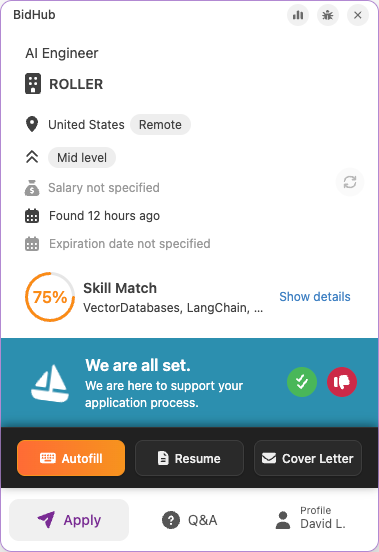
The Apply tab is the main working view for reviewing the opportunity and moving through the application.
It surfaces the most important context for the current job, including job details, match information, and quick actions for Autofill and documents. This helps users understand the role before spending time on the application and move forward with the correct profile and materials.
Autofill
BidHub Copilot can fill application form fields using the selected profile.
This includes structured profile-based fields such as first name, last name, gender, contact details, work history, and LinkedIn URL.
These standard Autofill actions do not consume AI-answer credits.
See Autofill.
Resume and cover letter handling
BidHub Copilot can work with uploaded resumes and cover letters during the apply flow.
This keeps document selection close to the application itself instead of forcing users to switch between multiple pages or tools.
For advanced options, see Resume & Cover Letter Tailoring.
Match rate and job fit
BidHub Copilot can help users understand how well a job matches the selected profile during the application process based on Apply Criteria.
This makes it easier to decide whether to continue, review the job more carefully, or switch to a different opportunity.
Q&A
The Q&A tab keeps application questions and answers in one place so they can be reviewed more clearly during the session.
Structured questions can be answered from profile data, while open-ended prompts can use AI support based on the profile, job description, and saved preferences from Tailor AI Answers. The screenshot below shows both types of questions in the same workflow.
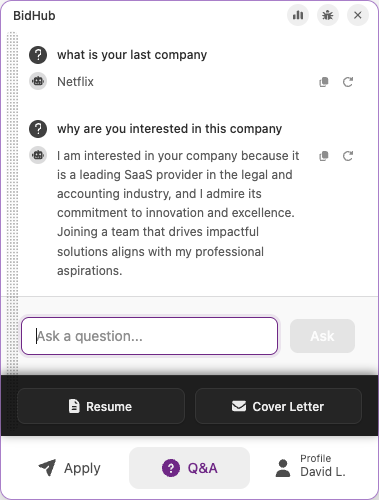
For example, a general question like what is your last company is answered from profile data and does not consume AI-answer credits. In the same screenshot, the open-ended question why are you interested in this company is the kind of AI-assisted response that does consume credits.
AI-assisted answers
BidHub Copilot can help answer open-ended application questions using profile data and job context.
This is the part of AI Answering that consumes credits. Simple profile-based questions and form fields are handled through Autofill instead.
Profile
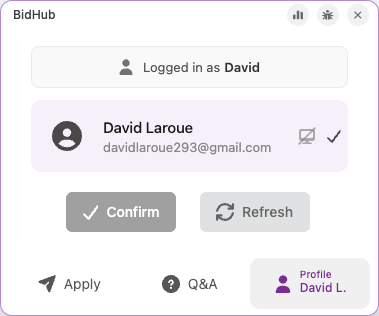
The Profile tab keeps the active profile visible during the session so users always know which profile, documents, and criteria are being used for the current application.
This is especially important for users managing multiple profiles or for Assistants working on behalf of Job Seekers, where profile accuracy directly affects Autofill quality, AI answers, and qualification results.
Why it matters
BidHub Copilot helps users:
- Reduce repeated manual work
- Keep applications more consistent
- Keep profile, answers, and documents aligned in one place
- Apply faster
- Review job fit before spending time on an application
- Support collaborative workflows between Job Seekers and Assistants